Introducing the Data Analyst: From Raw Data to Publication-Ready Charts in Minutes
The new Data Analyst feature brings data retrieval, analysis, and styled charts together seamlessly inside CountryRisk.io Insights.

Bernhard Obenhuber
Jun 01, 2026
Turning raw economic or financial market data into clear, compelling insights is a core task for any economist or risk analyst. In practice, however, this process is often slower and more repetitive than it should be—searching for the right indicators, validating sources, writing code to clean data, refining charts, and aligning everything with internal style guides.
This is exactly the problem the new Data Analyst feature in the CountryRisk.io Insights platform is designed to solve and will be available soon.
Below, we walk through what it does—and why it fundamentally changes how analysts work with data. Or you can watch a short video here (Link).
A Smarter Way to Go from Question to Insight
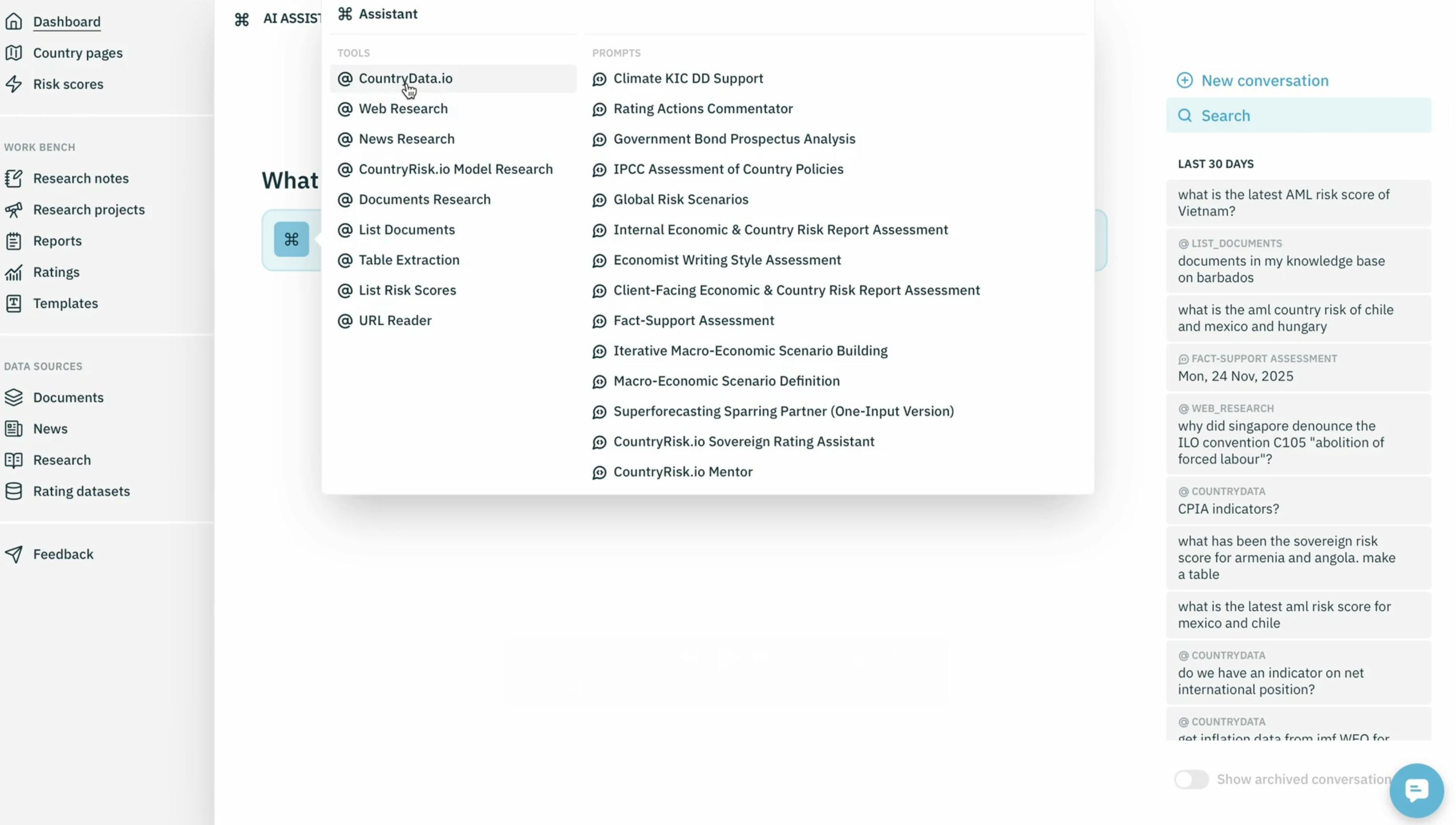
We start inside the Insights platform by opening the AI Assistant and launching a new conversation. Suppose we want to analyse the US yield curve. Instead of manually navigating data portals, we simply select the CountryData.io tool—our direct bridge into the data layer—and ask for the 1-, 5-, and 10-year US Treasury yields.
From there, the Data Analyst takes over.
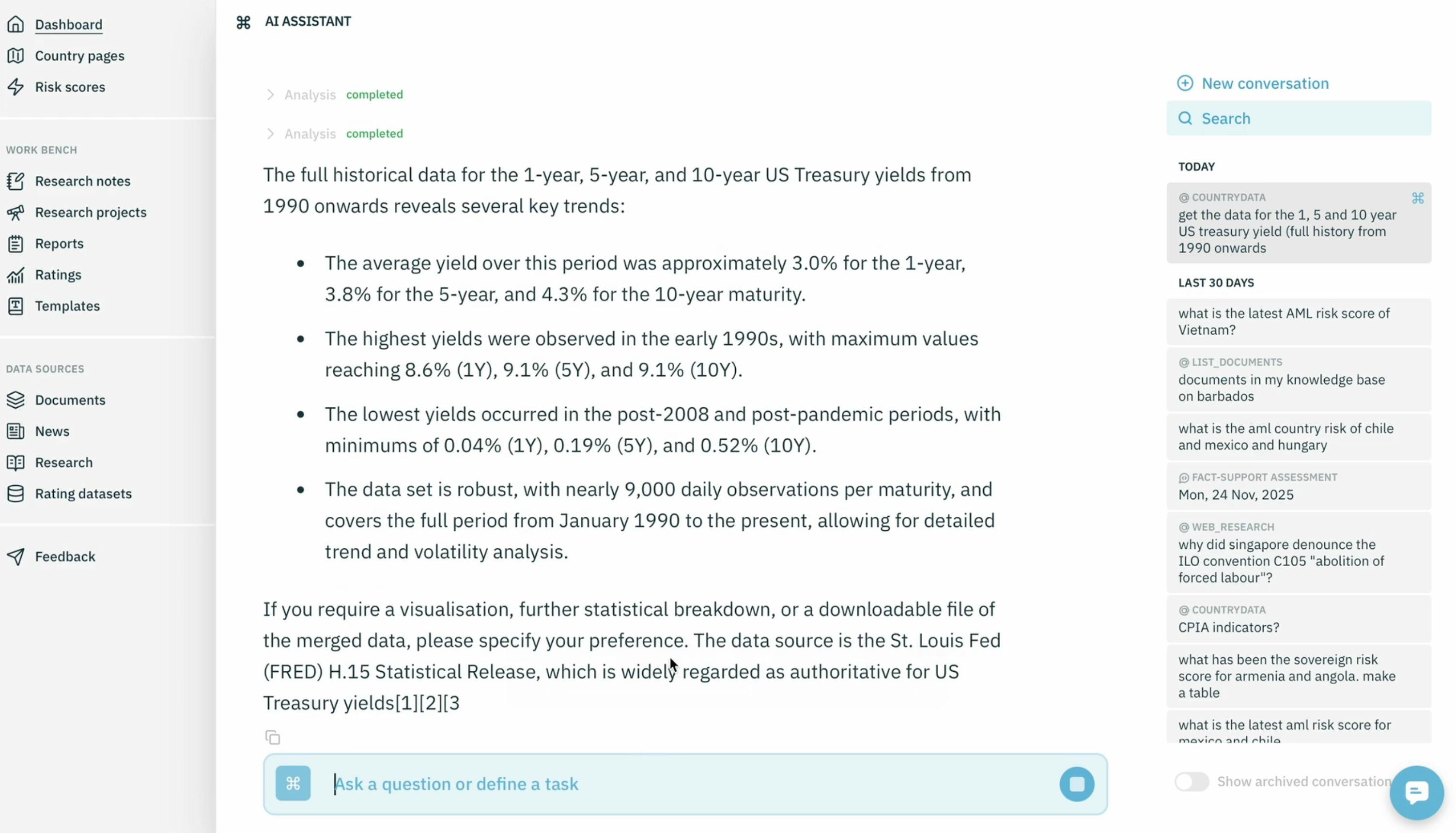
Behind the scenes, it checks whether the requested indicators exist, whether the request is ambiguous, and whether clarification is needed. In this case, the data is well defined and readily available, so the system fetches it directly—three API calls, one per tenor.
Within seconds, we receive:
- The requested time series
- A concise analytical summary
- A transparent reference to the underlying source (here: the St. Louis Fed)
No manual validation. No guesswork.
Why Owning the Data Pipeline Matters
What makes this experience reliable is that we control the entire data pipeline end-to-end.
With CountryData.io and our Model Context Protocol (MCP), we define:
- How raw data is ingested
- How each indicator is represented in embeddings
- Which filters and attributes are available
- What the AI is allowed to return
Because nothing is left to chance, the Data Analyst delivers results that are precise, explainable, and dependable—every time.
And because CountryData.io can also ingest user-provided internal data, organisations can analyse proprietary datasets alongside public macroeconomic indicators within the same environment.
From Analysis to Charts—Automatically
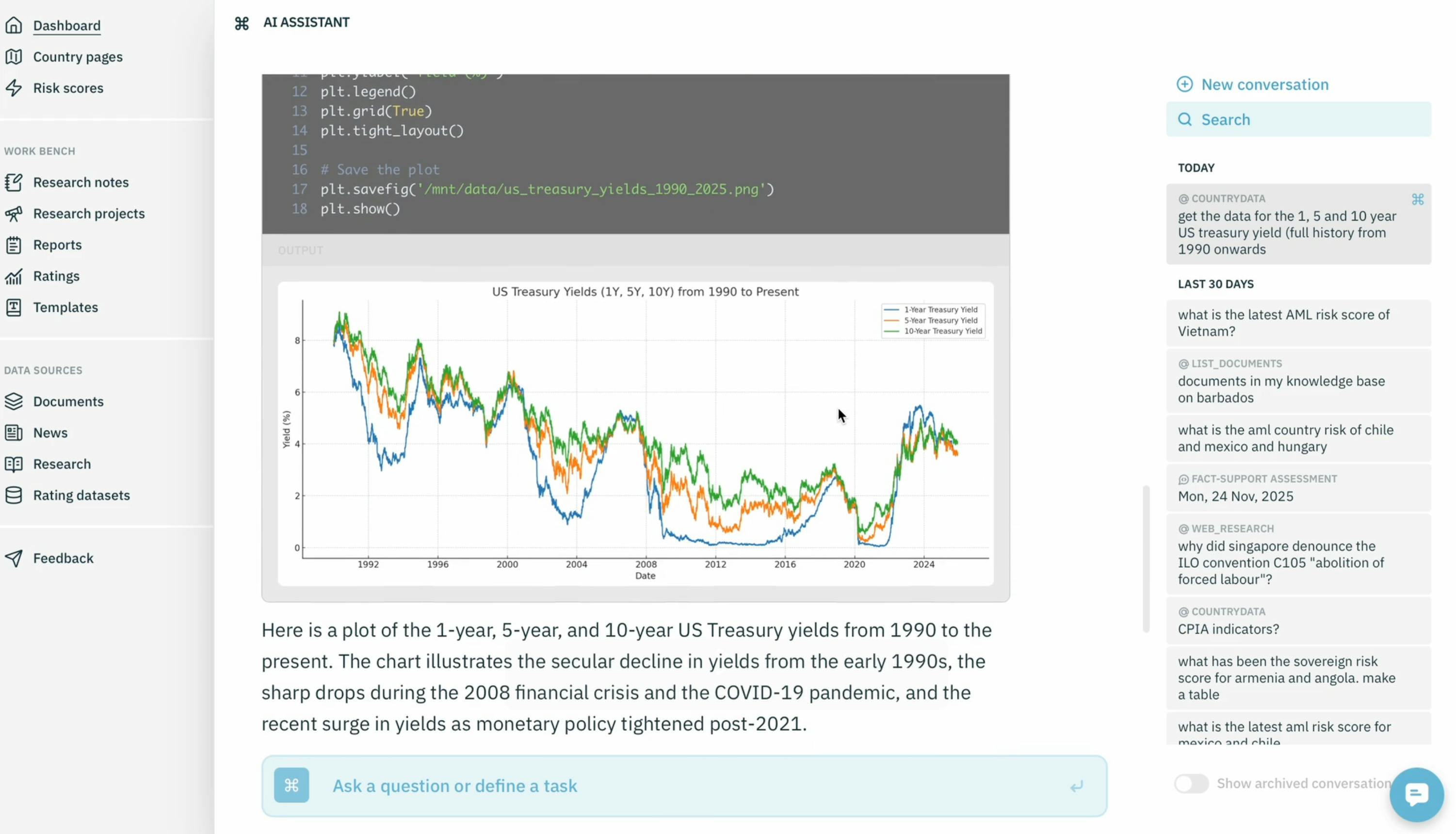
Analysis without visuals is incomplete. So the next step is simple: we ask for a chart.
Using the integrated code interpreter, the Data Analyst automatically generates and executes the Python code required to produce a clean, ready-to-use chart. Users can inspect the code if they want—or focus purely on the output.
The result: a high-quality chart generated in seconds.
Adding Context: Recession Shading in One Step
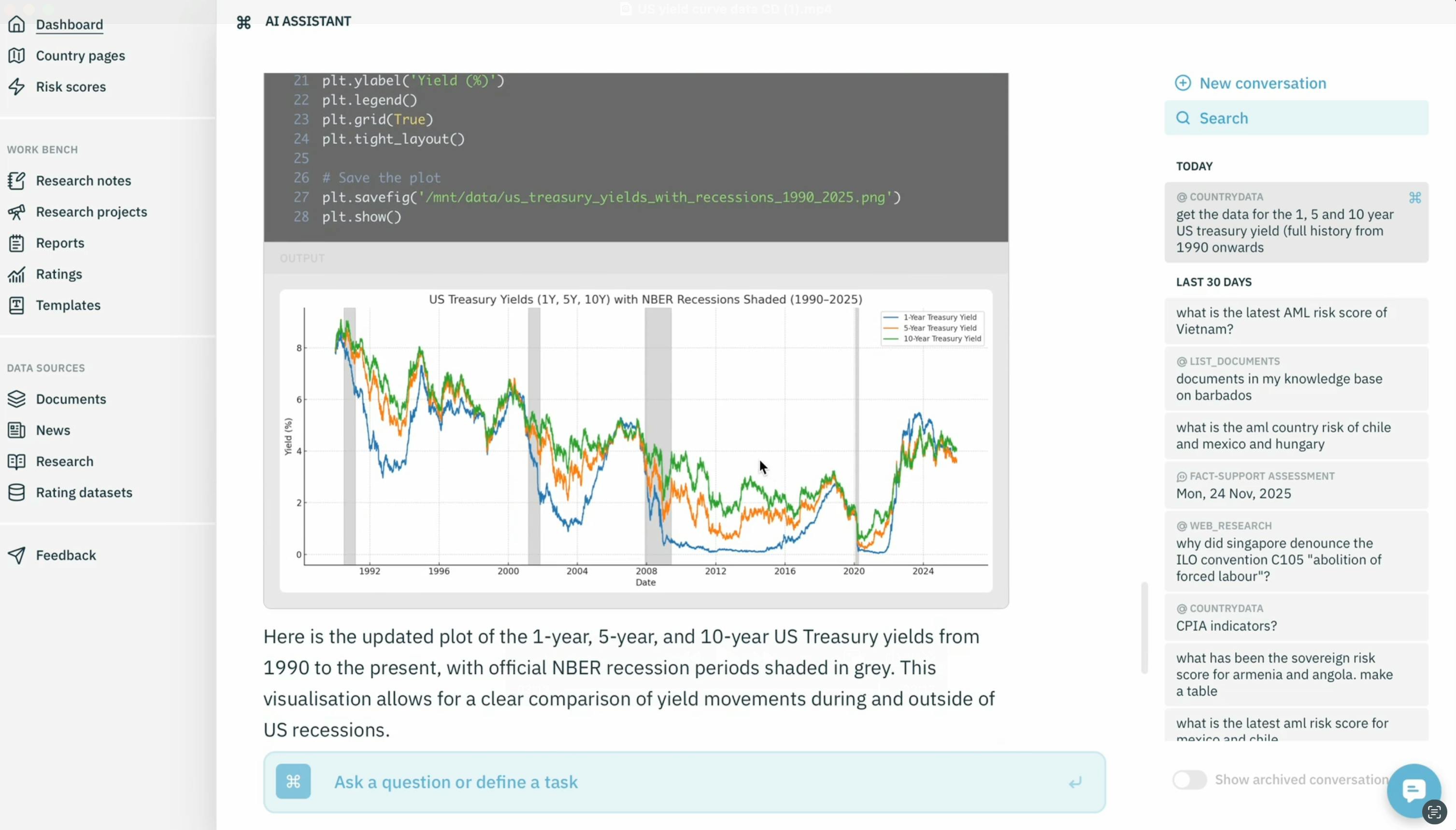
Now let’s take it further. Suppose we want to enrich the yield curve chart with US recession periods.
The Data Analyst first checks whether recession dates are available in CountryData.io. When they are not, it immediately proposes a sensible alternative: using the official recession chronology from the National Bureau of Economic Research.
With a single confirmation, the tool:
- Updates the Python code
- Integrates the recession periods
- Regenerates the chart
The result is a publication-ready yield curve chart with recession shading, produced in minutes—without manual coding or cross-checking multiple data sources. The chart can simply be downloaded or copy-and-pasted into the other tools within the platform.
Consistent Charts with the CountryRisk.io Style Guide
When charts are used in reports or presentations, consistency matters. Fonts, colors, gridlines, and layout should reflect a clear corporate identity.
Instead of relying on repeated follow-up prompts, the Insights platform offers a better solution: the Prompt Library.
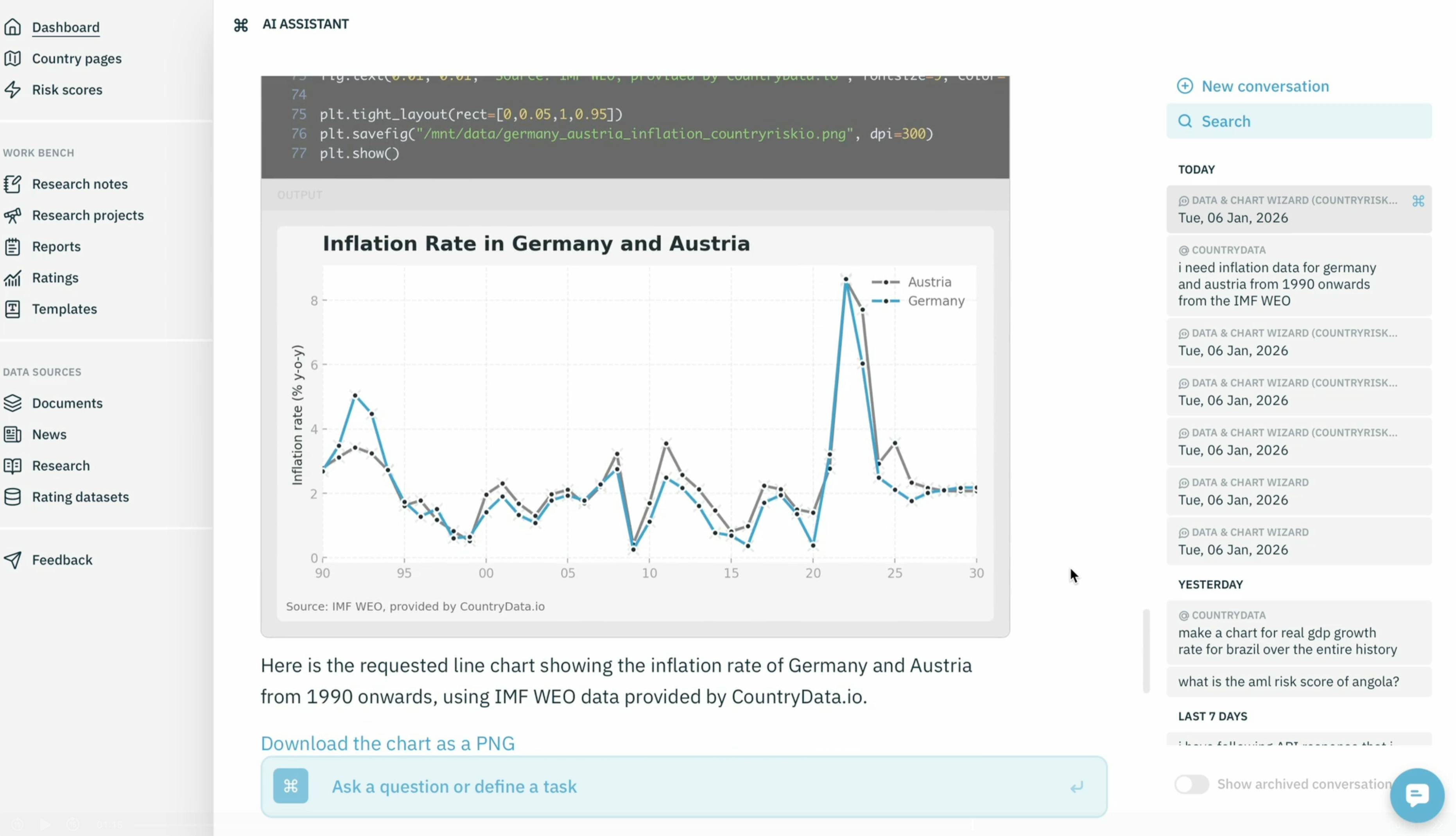
Using the Data & Chart Wizard template, we can generate charts that automatically adhere to the CountryRisk.io style guide. For example, we ask for a line chart showing the inflation rate of Germany and Austria.
Before executing, the wizard briefly summarizes what it will do and asks for confirmation. Once approved, it:
- Identifies the correct indicators via CountryData.io
- Fetches the data for both countries
- Generates the chart using pre-defined style specifications
The resulting Python code embeds the CountryRisk.io font, color palette, gridlines, and chart conventions—ensuring consistency across teams and outputs.
Templates You Can Reuse and Share
The instructions behind the Data & Chart Wizard are stored as reusable templates in the template library. These templates document:
- The analytical steps
- Clarification logic
- Style-guide rules (globally and per chart type)
They can be shared across teams, helping organisations standardise both analysis and visual output—without sacrificing flexibility.
Why We’re Excited About the Data Analyst
Until now, analysts using Insights had powerful tools for writing, structuring research, and running repeatable workflows—but the data step still lived outside the platform.
With the Data Analyst, that final gap is closed.
Users can now:
- Find relevant indicator from a large data pool of public and private data
- Retrieve the raw data and download it as a spreadsheet or analyse it directly within the platform
- Visualise it and apply defined style guides to it
- Generate commentary
—all within a single, integrated environment that mirrors the real workflow of an economist or risk analyst.
At the same time, CountryData.io provides a scalable data backbone purpose-built for economic and country risk analysis, and the MCP ensures that the same data access can power other tools where productivity gains matter most.
See It in Action
The Data Analyst is a major step toward a true end-to-end research environment.
If you’d like to see it in action—or learn how it could fit into your organisation’s workflow—feel free to reach out. We’d be happy to walk you through a live demo of the Insights platform and our broader toolset. You can reach us at [email protected]